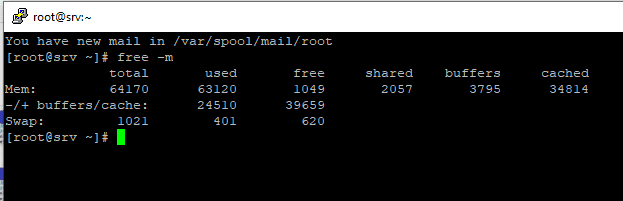
Checking Linux Memory usage # free -m Shows the current memory usage, formatted in MB
cat /proc/meminfo Check the values of MemTotal, MemFree, Buffers, Cached, SwapTotal, SwapFree. They indicate same values of memory usage as the free command above.
Once you’ve got a handle on the values and system usage, you can attempt to reduce the footprint,
Clear Pagecache # sync; echo 1 > /proc/sys/vm/drop_caches
Clear dentries and inodes # sync; echo 2 > /proc/sys/vm/drop_caches
Clear PageCache, dentries and inodes # sync; echo 3 > /proc/sys/vm/drop_caches
Force Swapfile to clear
#swapoff -a && swapon -a
This will disable and re-enable the SWAP Cache, it may take a while to process this command.